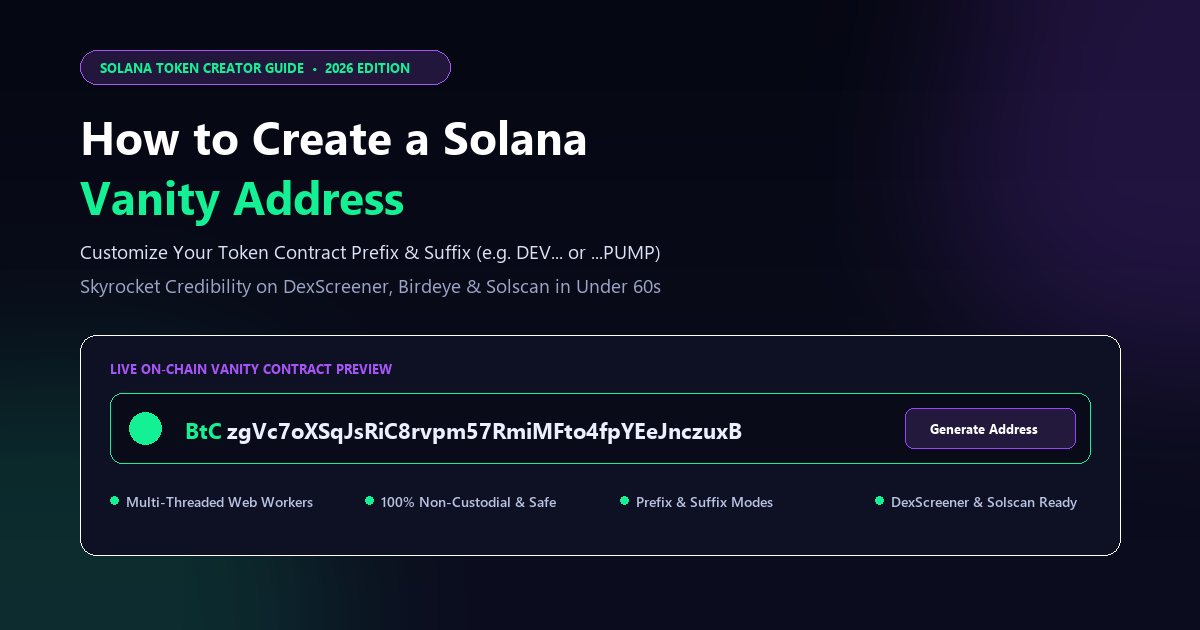
Overview: Why Every Top Solana Token Uses a Vanity Address
In the fast-moving Solana decentralized finance (DeFi) and meme coin landscape, first impressions dictate success. Every second, hundreds of new SPL tokens compete for attention on DexScreener, Birdeye, Solscan, and Telegram trading bots. While standard tokens launch with completely random, unreadable 44-character cryptographic addresses (such as `7xKZj9qP2sW8f...`), top-tier projects and elite meme coins launch with **Solana Vanity Addresses**.
A Solana vanity address is a personalized, custom contract address engineered to feature human-readable words or specific branding characters at the beginning (prefix) or the end (suffix). Popular examples include addresses starting with `DEV...`, `BTC...`, `SOL...`, or ending with the viral `...pump`, `...win`, or `...moon` suffixes.
Why Every Serious Solana Project Uses a Vanity Contract Address:
• **Instant Trader Trust & Professionalism:** When retail buyers scan DexScreener or Birdeye, a customized address immediately proves that the creator invested thought, time, and resources into the project. It signals high conviction over low-effort rug pulls.
• **Anti-Phishing & Impersonation Shield:** In crypto, scam bots deploy duplicate tokens with identical names and tickers within seconds of a hype launch. A distinctive vanity address (such as ending in `...PUMP` or starting with `DEV`) makes it easy for your community to identify the genuine contract address and avoid clone scams.
• **High-Impact Brand Identity:** A token with ticker `$PUMP` whose contract address literally ends in `...PUMP` possesses superior memetic power. It looks sleek on Solscan explorer receipts, social media teasers, and transaction alerts.
• **100% On-Chain Authenticity:** Unlike display names, logos, or social links which can be edited or spoofed, a vanity contract address is cryptographically hardcoded into the immutable Solana ledger.
In this step-by-step tutorial, you will learn the exact mechanics of Solana vanity addresses, how to generate custom prefixes and suffixes directly inside your browser in under 60 seconds using the [MinTools Token Creator](/create-token), and how to deploy your branded token seamlessly without writing a single line of code.
Understanding Solana Base58 Cryptography & Speed Benchmarks
To understand how vanity addresses are generated, we must look under the hood at Solana's cryptographic architecture.
On Solana, every wallet address and token mint address is a 32-byte Ed25519 public key. When displayed to humans, this 32-byte binary string is encoded using the **Base58** alphabet. Base58 consists of 58 alphanumeric characters:
• Numbers: `1 2 3 4 5 6 7 8 9` (note: number `0` is excluded to avoid confusion)
• Uppercase: `A B C D E F G H J K L M N P Q R S T U V W X Y Z` (note: uppercase `I` and `O` are excluded)
• Lowercase: `a b c d e f g h i j k m n o p q r s t u v w x y z` (note: lowercase `l` is excluded)
How Vanity Generation Works:
Because Ed25519 public keys cannot be reverse-engineered from desired text, vanity addresses are generated through high-speed cryptographic search. An algorithm generates private/public keypairs in an ultra-fast loop, converts each public key to Base58, and checks whether the resulting string starts or ends with your desired letters.
Why Prefix and Suffix Generation Speeds Differ (The 44-Character Math):
Solana public keys represent 256-bit integers. When converted to Base58, the resulting address is typically 43 or 44 characters long. Due to the division algorithm used in Base58 conversion, the very first character of a 44-character address is mathematically restricted — characters `1–9` and `A–H` appear with much higher statistical probability than letters later in the alphabet like `M`, `W`, or `Z`.
In contrast, the **Suffix (end of the address)** has a completely uniform 1 in 58 distribution across all characters! This means generating a suffix like `pump` is consistently ultra-fast.
| Vanity Target Length | Prefix / Suffix Example | Search Space (Combinations) | Average Generation Time (Browser) | Recommended For |
| --- | --- | --- | --- | --- |
| 1 to 2 Characters | DEV, SOL, WIN | ~3,364 hashes | Instant (< 5 seconds) | Quick Meme Coins & Testing |
| 3 Characters | BTC, DEX, MNT | ~195,112 hashes | 5 to 20 seconds | Standard Branded Tokens |
| 4 Characters | PUMP, MOON, GOLD | ~11.3 Million hashes | 1 to 3 minutes | High-Tier Meme Coins & DAOs |
| 5+ Characters | SOLANA, BITCOIN | ~656 Million hashes | Hours / High-End GPU Rig | Major Protocols & Foundations |
Step 1: Enable Custom Address (Vanity) in MinTools
Generating a custom contract address on Solana historically required installing Rust, downloading the Solana CLI, and running GPU-intensive command-line scripts. With MinTools, the entire process is automated inside your web browser.
Step 1: Open MinTools Token Creator and Activate Custom Address
Navigate to the [MinTools Token Creator](/create-token). Scroll down past the initial token metadata inputs until you see the **Custom Address (Vanity)** section marked with a purple NEW badge.
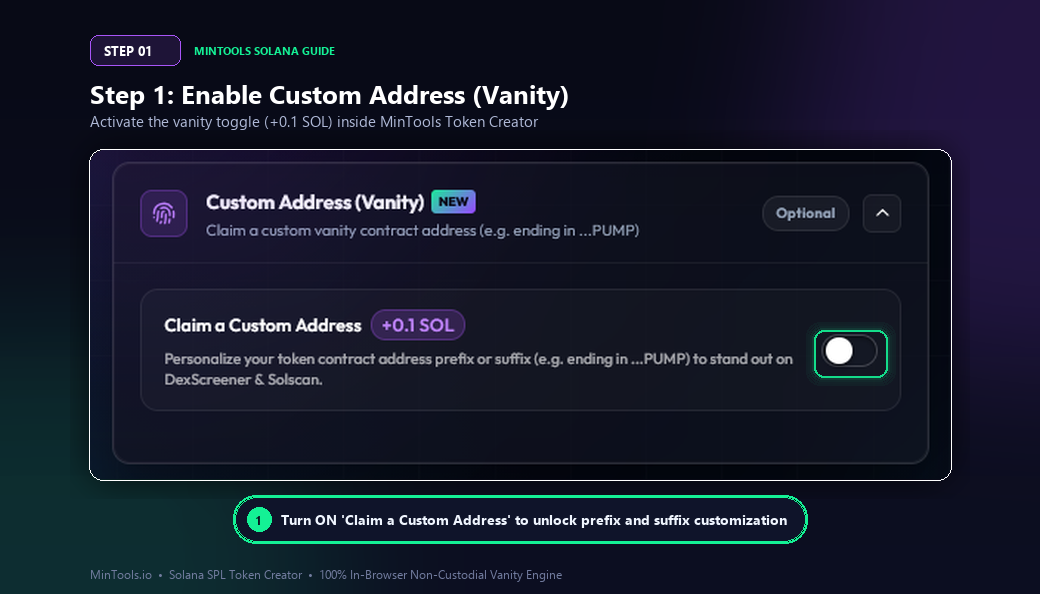
Click the toggle switch next to **Claim a Custom Address (+0.1 SOL)**.
Notice the transparent pricing: MinTools charges a minor, flat fee of only +0.1 SOL for vanity address generation and deployment. Compared to third-party services that charge 0.5 to 1.5 SOL or custodial generators that demand access to your wallet keys, MinTools offers the most affordable and secure non-custodial solution on Solana.
Step 2: Configure Your Custom Prefix (e.g., DEV, BTC, SOL)
Once the feature is enabled, you can choose whether you want to personalize the beginning (Prefix) or the end (Suffix) of your token contract address.
Step 2: Enter Your Desired Prefix
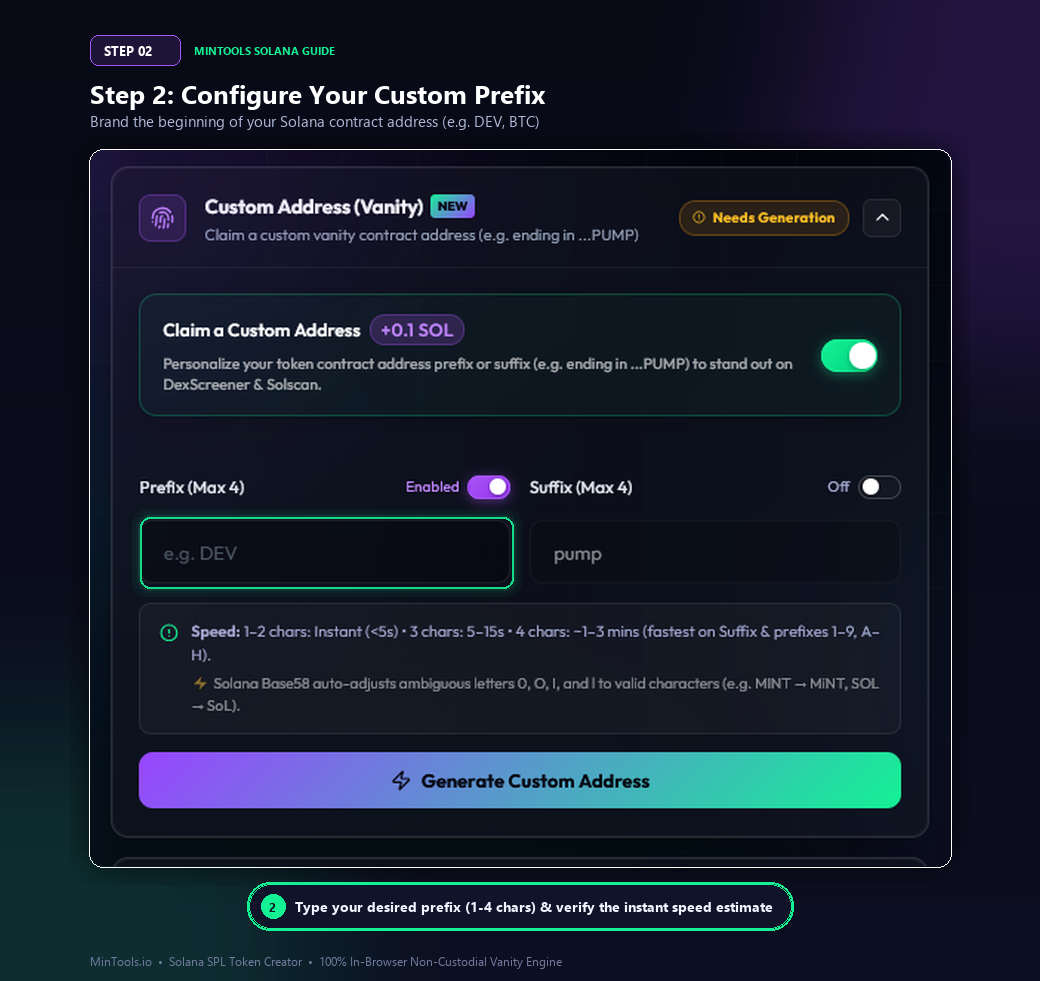
Click the toggle next to **Prefix (Max 4)** to turn it ON. Enter your chosen prefix (up to 4 alphanumeric characters) in the input box.
Popular Prefix Ideas:
• **Brand or Ticker:** `BTC`, `ETH`, `SOL`, `DEX`, `VIP`
• **Developer Tokens:** `DEV`, `PRO`, `BOT`, `GEN`
• **Community Tokens:** `DAO`, `WIN`, `TOP`, `GOD`
MinTools provides real-time character validation. If you accidentally type ambiguous Base58 letters like `0`, `O`, `I`, or `l`, the system automatically adjusts them to valid alternatives (for example, `MINT` → `MiNT`, or `SOL` → `SoL`) so your generation never gets stuck or errors out.
Step 3: Or Target a Custom Suffix (e.g., ...PUMP, ...WIN)
If you are launching a meme coin or targeting the degen trading community, a custom Suffix is frequently the most impactful choice.
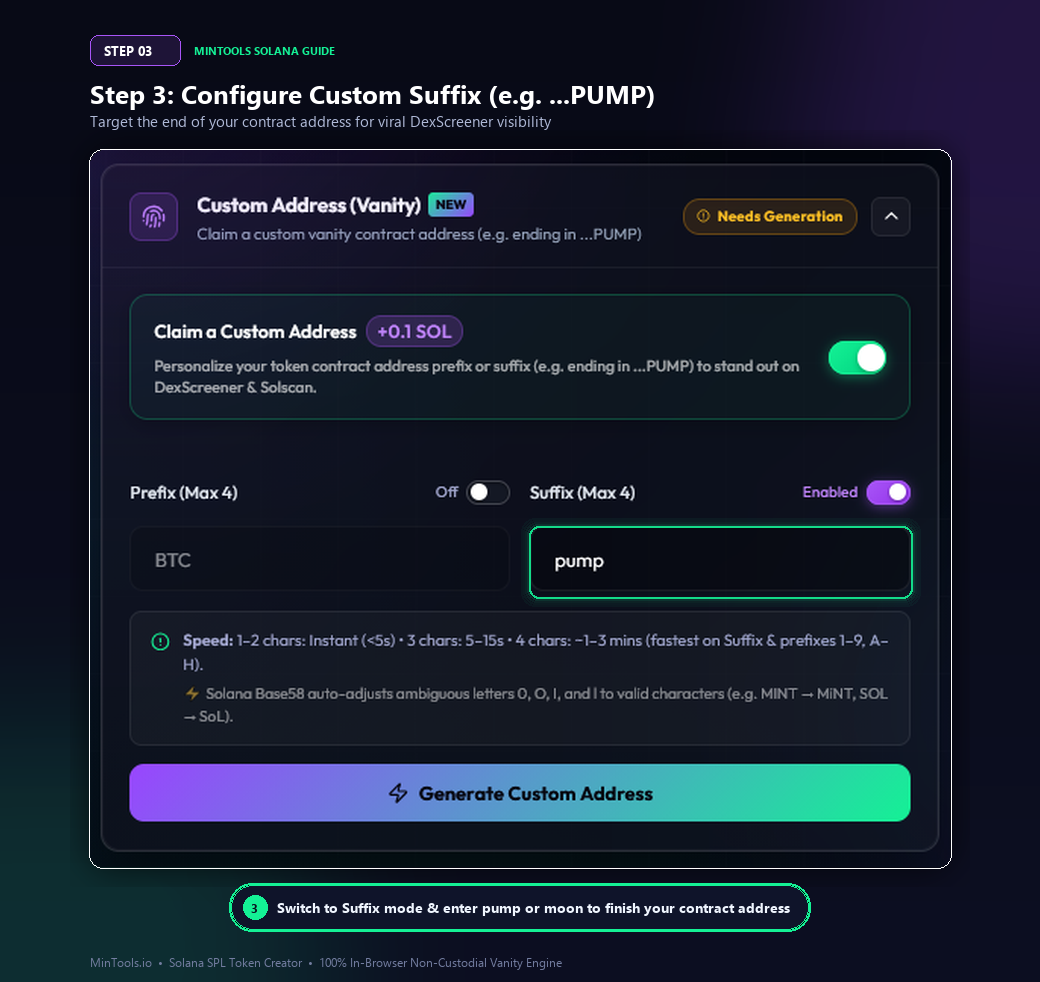
Step 3: Switch to Suffix Mode
Toggle the Prefix switch OFF and toggle the **Suffix (Max 4)** switch ON. Enter your target suffix (such as `pump`, `moon`, or `win`).
Why Suffix Addresses Dominate Meme Coin Culture:
On DexScreener, Birdeye, Photon, and BullX, token contract addresses are truncated in mobile and desktop lists (e.g. `9xZq...pump`). Traders skimming new pairs immediately see the `pump` ending, instantly associating the coin with high-octane memetic energy.
Because the Suffix mathematical distribution is completely uniform across all Base58 characters, suffixes like `pump` generate reliably and rapidly across all devices.
Step 4: Master the Cryptographic Speed Optimization Tip
To ensure your token launches without delay, MinTools includes an intelligent mathematical analyzer that inspects your chosen letters.
Step 4: Review the Cryptographic Pro Tip
When you enter certain prefixes, you may see a gold information banner titled **Pro Tip: Solana 44-char addresses mathematically favor prefixes starting with 1–9 or A–H**.
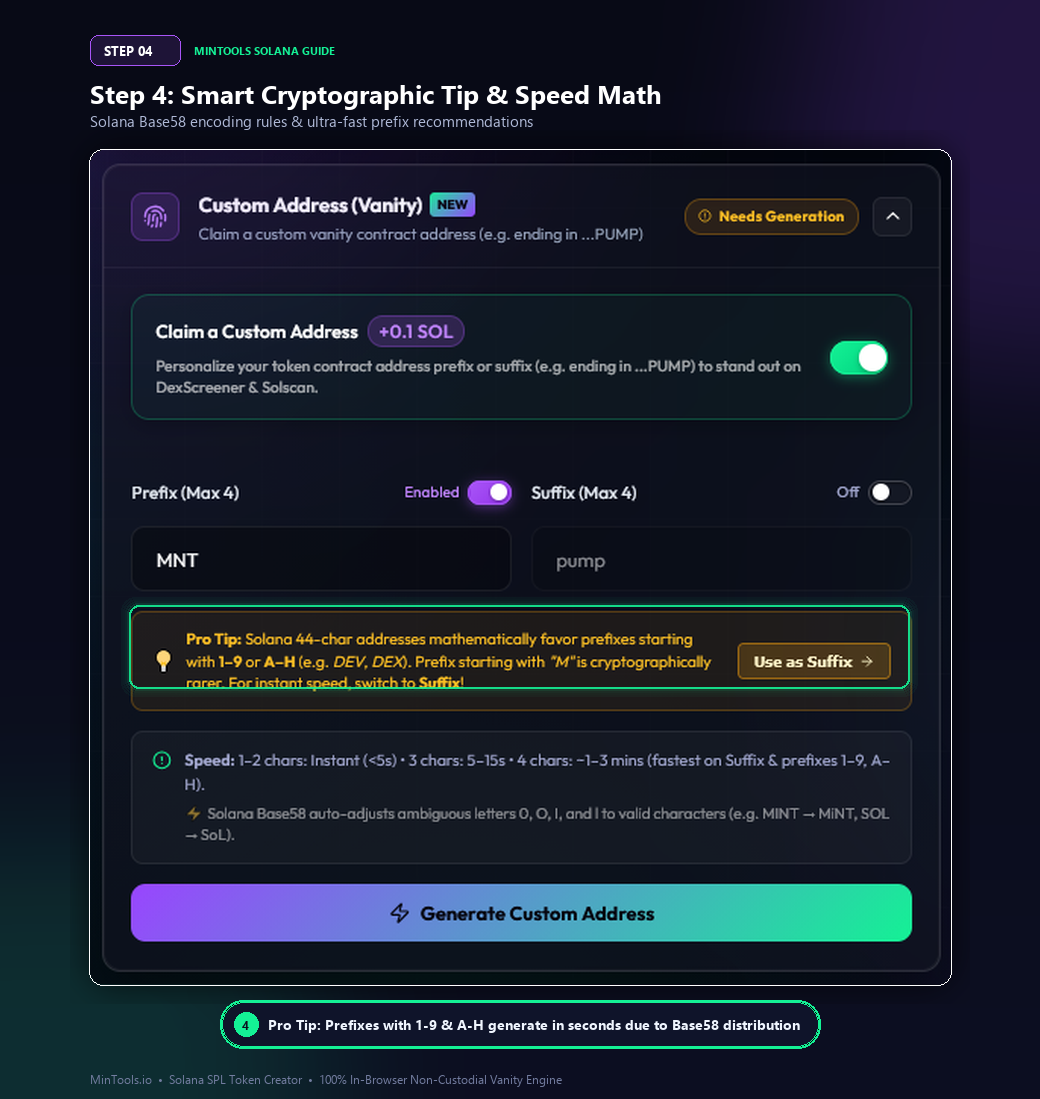
How to Use This Tip to Generate in Under 5 Seconds:
• **Ultra-Fast Prefixes:** Prefixes starting with numbers `1` through `9` or capital letters `A`, `B`, `C`, `D`, `E`, `F`, `G`, or `H` (such as `DEV`, `DEX`, `BTC`, `ACE`, `BULL`) compute in under 5 to 15 seconds.
• **Rarer Prefixes:** Prefixes starting with letters later in the Base58 alphabet (such as `M`, `T`, `W`) have fewer mathematical solutions at position 0 of 44-character addresses and take longer to solve.
• **The Instant Speed Shortcut:** If you want an `M` or `W` word (such as `MOON` or `WIN`), click the **"Use as Suffix →"** button! In Suffix mode, all letters solve with equal, maximum speed.
Step 5: Multi-Threaded In-Browser Keypair Generation
You are now ready to generate your custom cryptographic keypair.
Step 5: Click Generate Custom Address
Click the vibrant purple-to-green gradient **Generate Custom Address** button.
Behind the scenes, MinTools activates a state-of-the-art multi-threaded Web Worker engine:
• **Full Multi-Core Acceleration:** The engine harnesses your device's multi-core CPU threads in parallel, testing thousands of Ed25519 keypairs per second.
• **100% Non-Custodial & Private:** Keypair generation executes entirely within your browser's local memory sandbox. No private keys, seeds, or secret data are ever transmitted across the internet or stored on our servers.
• **Smooth UI:** Because computation runs inside background Web Workers, your browser tab remains silky-smooth and responsive throughout the process.
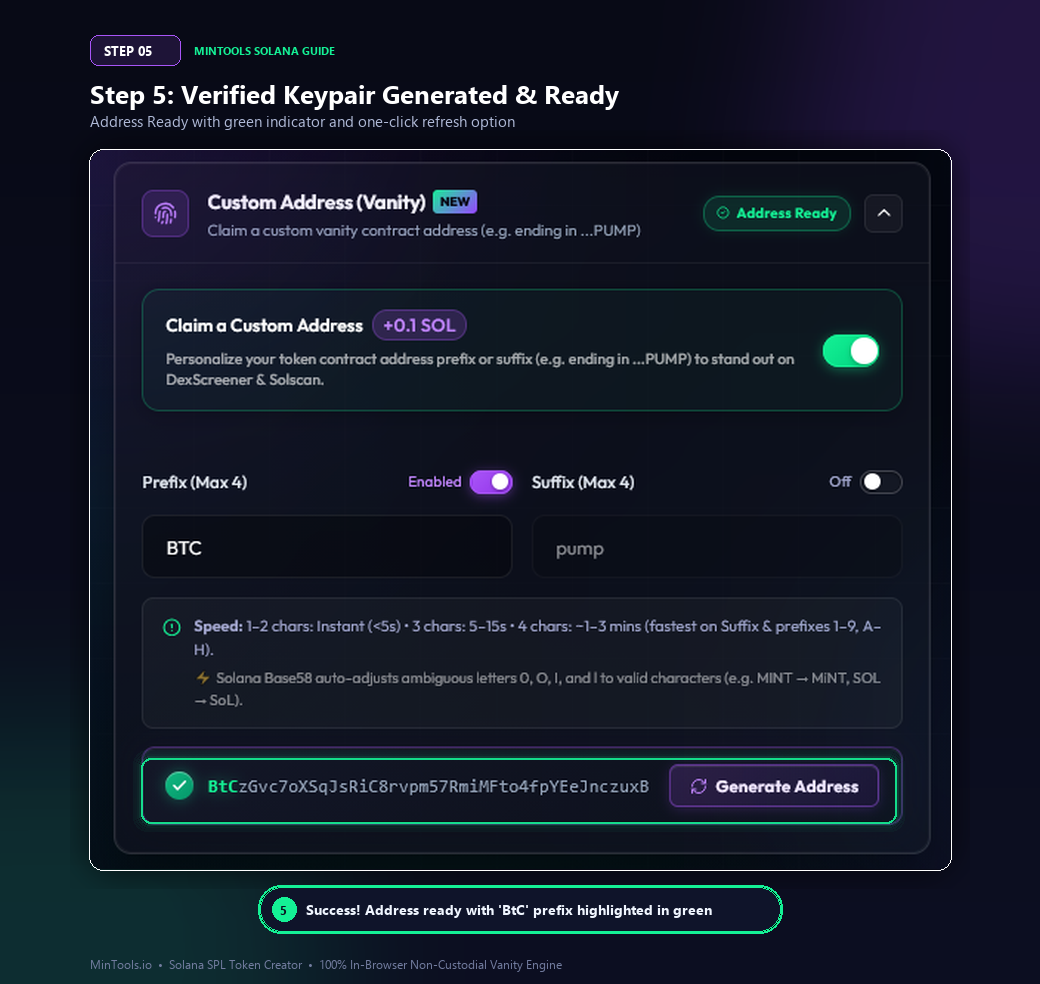
Within seconds, the top badge transitions to a green **Address Ready** state, and the verified contract preview bar appears:
• A glowing green checkmark confirms cryptographic validity.
• Your custom prefix or suffix is highlighted in bold emerald green (`#14f195`) so you can visually verify the match.
• Need another option? Click the glassmorphic **Generate Address** button with the refresh icon to spin up a fresh vanity keypair until you find the exact character combination you love.
Step 6: Deploy Your Branded SPL Token to Solana Mainnet
With your custom vanity address locked in, deploying your token on Solana Mainnet takes under 60 seconds.
Step 6: Complete Token Parameters & Deploy
1. **Token Metadata:** Enter your Token Name (e.g. `Bitcoin Solana`), Token Symbol (e.g. `$BTC`), Decimals (typically 9 or 6), and Total Supply (e.g. 1 Billion tokens for meme coins).
2. **Upload Token Logo:** Upload your 512x512px logo. MinTools uploads the image and metadata JSON directly to decentralized IPFS/Arweave storage for permanent on-chain availability.
3. **Configure Authorities (Crucial for Investor Trust):**
• **Revoke Freeze Authority:** Strongly recommended (and mandatory for Raydium pools) so investors know their funds can never be frozen.
• **Revoke Mint Authority:** Caps total supply forever, earning high security scores on [Token Scanner](/scanner) and RugCheck.xyz.
4. **Review & Confirm:** Click the gradient **Create Token** button. Approve the single transaction in your connected wallet (Phantom, Solflare, or Backpack).
Within milliseconds of blockchain confirmation, your SPL token is deployed with the exact vanity contract address you generated, and 100% of the token supply is deposited directly into your wallet. From here, you can proceed to [Create a Raydium Liquidity Pool](/create-liquidity) or lock your liquidity with [Burn & Lock LP](/burn-lp).
Marketing Your Vanity Address: Best Practices for Maximum Volume
A vanity address is not just a technical feature — it is a potent marketing weapon. Here is how top projects maximize its impact:
• **Highlight the Address in Social Announcements:** When sharing your contract address (CA) on Twitter/X, Telegram, and Discord, emphasize the custom prefix or suffix (e.g., `Official CA ends in ...PUMP! Beware of fakes!`).
• **Pin in Telegram Portals:** Configure your Telegram welcome bot and `/ca` command to showcase the vanity address so new members instantly recognize the authentic token.
• **Apply for Fast-Track DEX Verification:** Listing platforms like DexScreener, Birdeye, and GeckoTerminal look favorably upon projects with distinctive, professional contract addresses.
• **Community Pride:** Holders love sharing screenshots of vanity contract addresses on Solscan and Birdeye because it looks legitimate, sleek, and memorable.
Troubleshooting & Common Mistakes to Avoid
Here are the most common pitfalls creators encounter with Solana vanity addresses and how to avoid them:
1. **Trying to Generate 5+ Characters in a Browser:**
Each additional character multiplies the search space by a factor of 58. While 1 to 4 characters generate in seconds or a few minutes, searching for 5 or 6 characters requires hundreds of millions of iterations that can overheat your device. Stick to 1–4 characters for browser generation.
2. **Using Ambiguous Base58 Letters:**
Trying to use `0` (zero), `O` (capital O), `I` (capital I), or `l` (lowercase L) in a standard address will fail on raw tools. MinTools automatically sanitizes and corrects these characters so you never have to worry.
3. **Using Untrusted, Custodial Web Generators:**
Never use online generators that generate private keys on remote backend servers. If a server holds the private key of your token mint, they can mint tokens or compromise your liquidity. MinTools generates all keypairs 100% client-side in your local browser sandbox.
4. **Insufficient SOL Balance:**
Ensure your wallet holds at least 0.15 to 0.20 SOL before deploying to cover the 0.1 SOL creation fee, the +0.1 SOL vanity option, and network rent for Metaplex accounts.
Frequently Asked Questions
Q: What is a Solana vanity address?
A: A Solana vanity address is a personalized, custom public key (contract address or wallet address) that contains human-readable words or specific characters at the beginning (prefix) or the end (suffix), such as starting with "DEV..." or ending with "...PUMP".
Q: How much does it cost to create a vanity token address on MinTools?
A: Creating a custom vanity token address on MinTools costs a flat add-on fee of only +0.1 SOL on top of standard token creation. This makes MinTools the most affordable automated vanity token generator on Solana.
Q: Is in-browser vanity generation safe?
A: Yes, 100%. MinTools utilizes the browser-native Web Workers API to generate Ed25519 keypairs entirely within your device's local memory sandbox. Private keys are never sent to any server, API, or third party.
Q: How long does it take to generate a vanity address?
A: 1–2 character prefixes or suffixes generate instantly (< 5 seconds). 3 characters take 5–20 seconds. 4-character suffixes (like "pump") take approximately 1–3 minutes depending on your device's CPU cores.
Q: Why can't I use letters like "O", "I", "l", or the number "0"?
A: Solana addresses use Base58 encoding, which intentionally excludes 0, O, I, and l to prevent visual confusion and typographical errors in financial transactions. MinTools automatically converts these characters to valid alternatives.
Q: Can I generate a vanity address with both a prefix and a suffix at the same time?
A: While technically possible in theory, searching for both a prefix and suffix simultaneously increases the mathematical search space to trillions of iterations, which is impractical for browser-based computation. MinTools allows you to select either a custom Prefix or a custom Suffix for optimal speed.
Q: Can I regenerate an address if I don't like the other characters?
A: Yes! After generating an address, you can click the "Generate Address" button with the refresh icon to instantly produce another unique keypair matching your prefix or suffix criteria.
Q: Will my vanity token address be compatible with Raydium, DexScreener, and Phantom?
A: Yes, 100%. A vanity address is a standard, fully compliant Solana SPL token mint address. It functions identically to any standard address on Raydium, Jupiter, Orca, DexScreener, Birdeye, Solscan, and all Solana wallets.
Q: Can I revoke Freeze and Mint authorities on a vanity token?
A: Yes. MinTools allows you to revoke Freeze Authority and Mint Authority during the token creation transaction, ensuring full decentralization, fixed supply, and top security ratings on RugCheck and Token Scanner.
Q: Do I need high-end hardware to generate a vanity address on MinTools?
A: No. MinTools is optimized to run smoothly on any standard modern laptop, desktop computer, or mobile smartphone with a modern web browser.